Insurance Eligibility Verification Software
Run the benefit. See the reimbursement context.
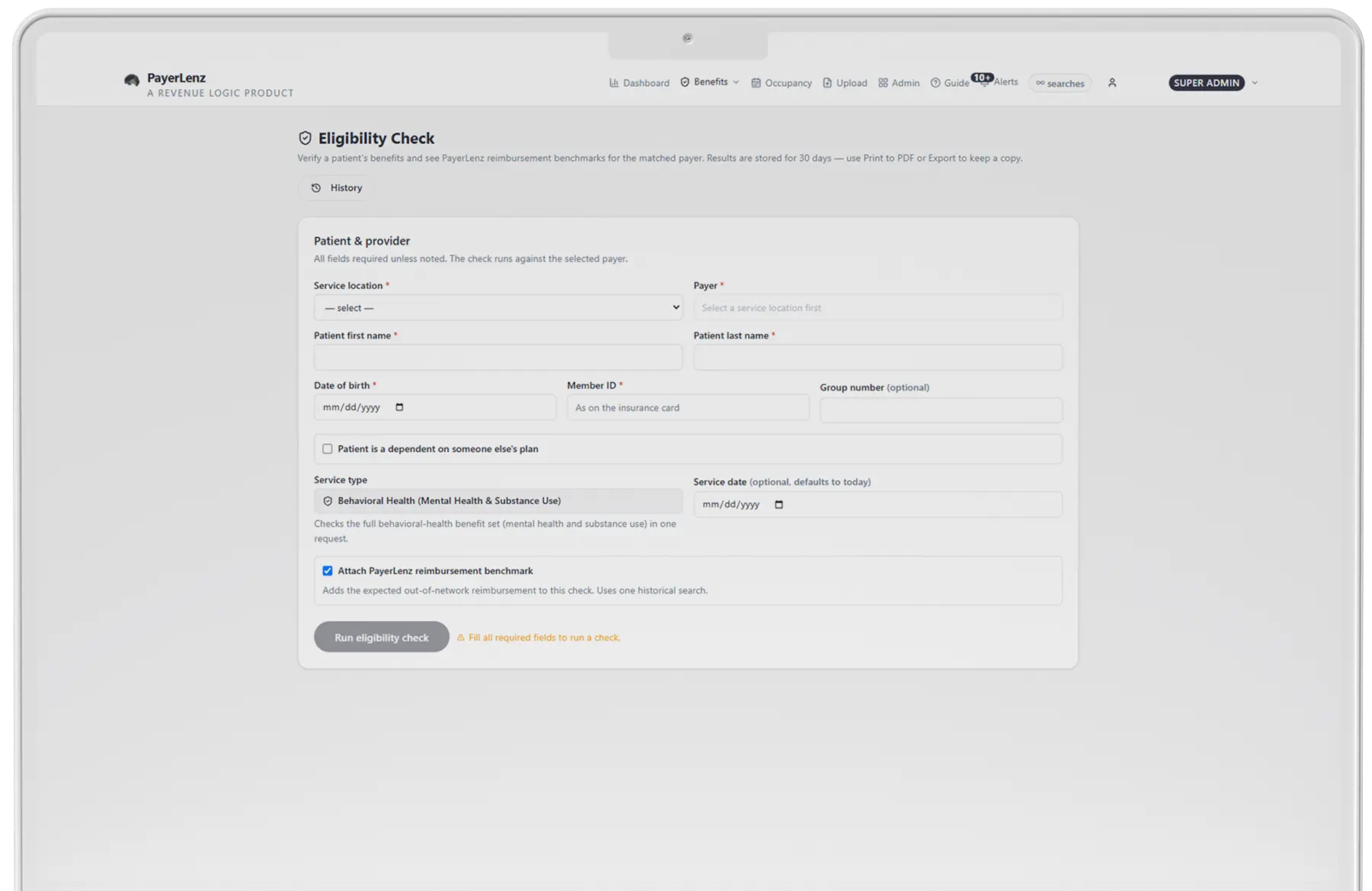
Enter the patient's name, date of birth, member ID, and payer. PayerLenz returns the live electronic eligibility response in seconds and places relevant reimbursement benchmark data beside it.
Your admissions team gets the coverage answer it expects, plus the rate context it usually has to chase through old EOBs, spreadsheets, or billing staff.
The Response
What the check returns
Coverage status
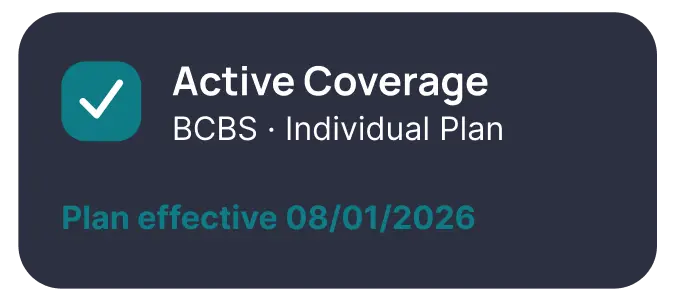
See whether the electronic payer response reports the member as active for the requested date. The response stays attached to the check record for review.
Behavioral health cost-share
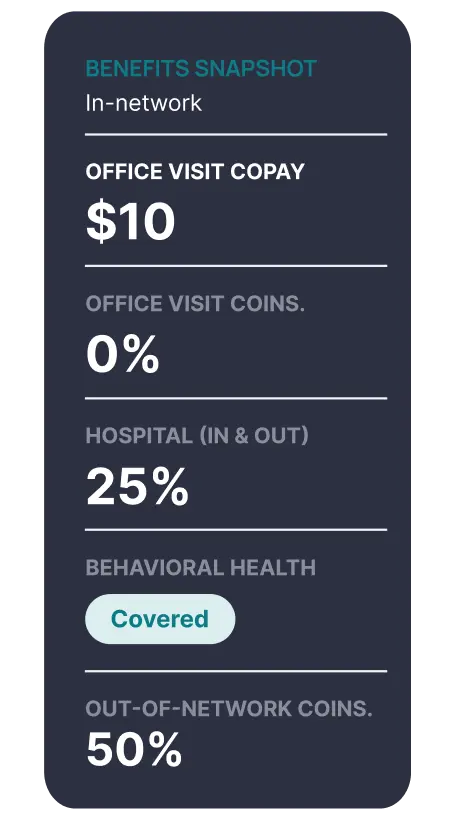
See the copay or coinsurance information returned for the relevant behavioral health benefit, mental health and substance-use facility benefits, inpatient and outpatient, kept distinct from general medical detail.
Reimbursement benchmark context
Review expected out-of-network reimbursement context for the matched payer, state, and level of care from the PayerLenz benchmark pool. The rate information is based on adjudicated claims. It isn't part of the payer's eligibility response and isn't a guarantee of claim payment.
Deductible and out-of-pocket detail
Review available in-network and out-of-network amounts, including:
- Deductible total
- Deductible met
- Deductible remaining
- Out-of-pocket maximum
- Out-of-pocket met
- Out-of-pocket remaining
Fields depend on what the payer returns. PayerLenz presents the available response; it doesn't fill missing payer data with an estimate.
Authorization and carve-out indicators
Identify returned prior-authorization requirements and signs that behavioral health benefits are administered by another organization. PayerLenz scans the response for known behavioral health administrators, Optum, Magellan, Beacon/Carelon, ComPsych, Evernorth, and flags the carve-out with its source. When a carve-out is detected, a one-click follow-up reruns the check against the carve-out administrator, threaded under the original.
One-click follow-up reruns against Optum →
One Screen, Not Two
One workflow instead of two disconnected lookups
| Standard eligibility result | PayerLenz result |
|---|---|
| Active or inactive coverage | Active or inactive coverage |
| Available deductible and out-of-pocket fields | Available in-network and out-of-network detail |
| General cost-share fields | Behavioral health cost-share context |
| Authorization fields when returned | Authorization and carve-out indicators when returned |
| No view of what comparable claims paid | Relevant reimbursement benchmark on the same screen |
Coverage and reimbursement remain different facts. PayerLenz shows them together without pretending they came from the same source.
The First Call
Built for the first admissions conversation
The caller wants to know whether insurance can be used. Your team needs to know more:
PayerLenz gives staff a structured way to answer all six. When the electronic response is incomplete, move the case to Live VOB rather than improvising around a missing field.
The Record
Keep a usable record
30 days of check history
Reopen recent results when a patient calls back or another team member takes over. Checks are kept for 30 days, then permanently deleted; export any result to keep it.
Export-ready results
Save any check, benchmark cards included, as a PNG or JPEG, or print to PDF for the patient file.
Included monthly checks
Every paid plan includes a monthly allotment of eligibility checks, with transparent per-check pricing beyond it.
One account across facilities
Paid plans include pooled seats and unlimited facilities, so teams can apply the same verification process across locations.
Benchmark methodology in view
Follow the trust score back to the volume and recency behind the rate context.
Eligibility or Live VOB
Know when to use electronic eligibility and when to call
Use it when:
You need a fast coverage response and the payer returns enough structured detail to proceed.
Use it when:
- The payer has limited electronic connectivity
- Key behavioral health fields are missing or unclear
- A carve-out needs to be traced
- The plan's authorization rules need verbal confirmation
- The response conflicts with information from the member or payer
An electronic eligibility response is not a guarantee of coverage or payment. Benefits can change, payer data can be incomplete, and the claim remains subject to plan terms and adjudication.
What does an insurance eligibility verification return? +
Enter name, date of birth, member ID and payer, and the live benefit response comes back in seconds. It includes in-network and out-of-network deductibles and out-of-pocket maximums, met and remaining, behavioral health cost-share, prior-authorization indicators and carve-out detection, alongside reimbursement benchmark context for that payer, state and level of care where data exists.
Does an eligibility check tell me whether the stay is authorized? +
No. The response returns prior-authorization indicators, which tell you whether authorization is required, not whether it has been granted. The authorization answer usually depends on the level of care and still has to come from the payer.
What is carve-out detection, and why does it matter? +
Behavioral health benefits are often administered by a different organization from the one named on the medical card. Carve-out detection flags when that has happened, so the check can be rerun against the administrator that will actually adjudicate the claim. A clean coverage answer from the wrong entity is the failure this prevents.
When is the electronic response not enough on its own? +
When the payer omits the out-of-network detail, when the plan is one your team has not seen before, or when the answer you need turns on the specific level of care. Those are the cases that earn a live VOB rather than another electronic run.